Guardrails and held runs
A guardrail is a limit that holds a run for your review instead of applying it. A held run changes nothing in your store until you approve it.
The guardrails
| Guardrail | Holds the run when | Default |
|---|---|---|
| Products going to zero | More than this share of matched products would go to zero stock | 20% |
| Price drop on a product | Any price would drop by more than this | 30% |
| Price rise on a product | Any price would rise by more than this | 100% |
| Drop in matched rows | The share of rows that match a variant falls by more than this, compared with the last applied run | 10 points |
| Drop in rows in the file | The file has this much fewer rows than at the last applied run | 20% |
| Products whose stock rises tenfold | More than this share of matched products would rise to ten times their stock or more | 20% |
| Price to zero | Any price would become 0 | Always on |
| Misplaced decimal point | A price would change by a factor of 100 | Always on |
| Mapped column missing | A column in your mapping is missing from the file | Always on |
| Margin floor | A new price, or a new cost, would leave a price below cost plus your margin | Off until you set it |
Change the limits
- Settings then Default guardrails sets the limits for every feed. Percentages go from 1 to 1000, points from 1 to 100. Choose Reset to defaults to go back.
- Each feed can set its own limits on its page, under Guardrails. A blank field uses the shop's default.
- Settings then Margin floor sets the lowest margin you accept, as a percentage over cost, from 0 to 100. Leave it blank to turn it off.
New limits apply from the next run.
Previews and guardrails
A preview never holds. If applying it would trip a guardrail, the run page says so, with the guardrail and the numbers. An apply is held, and so is a scheduled run, which is an apply.
Review a held run
You learn about a held run from the alert email, the banner on Home, and the Held runs needing review list on Home.
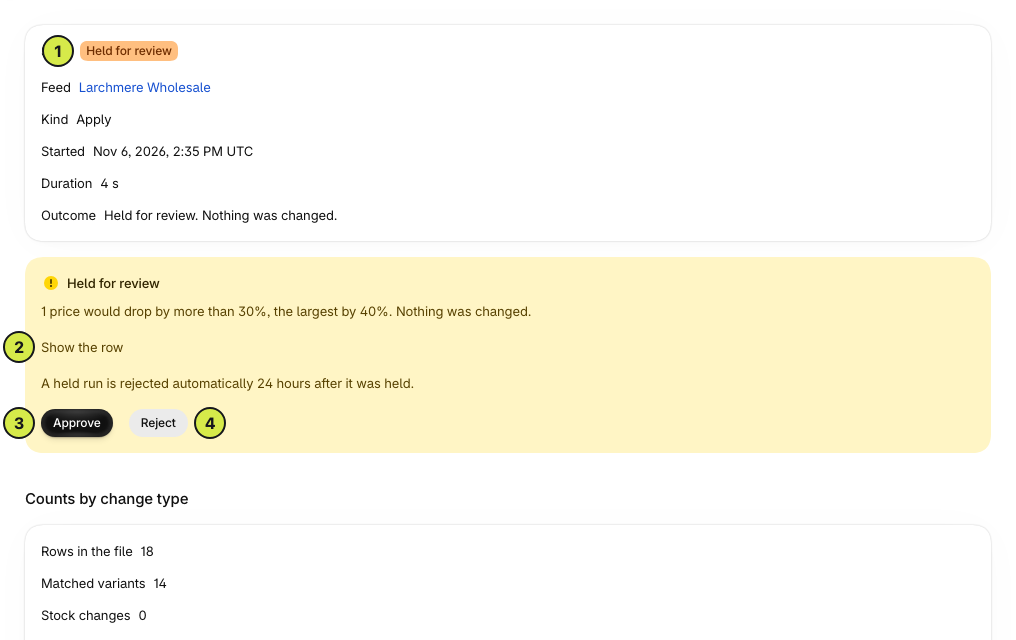
- Open the run. The Held for review banner says which guardrail tripped, for example: "34% of matched products would go to zero. Nothing was changed." When several guardrails tripped, it lists each one.
- Choose Show the rows (Show the row when only one row tripped it) to see the changes that tripped the guardrail.
- Choose Approve or Reject.
A held run is never approved from a list. You always open it first.
Approve
Approving starts a new run that fetches the file again. It applies only if the file is unchanged and no new guardrail trips. Otherwise it is held again, so you review what is new.
Reject
Rejecting writes nothing to your store. The run is closed as rejected. The next run of the feed starts from a fresh file.
After 24 hours
A held run is rejected automatically 24 hours after it was held. Run the feed again to review a fresh preview.
While a run is held
A held run blocks only its own feed. While it is held, that feed starts no other run, scheduled runs included, and cannot be rolled back. Your other feeds keep running as usual. Approve or reject it soon, so the feed's schedule resumes.