Schedules and stale feeds
Hourly schedules
On the Unlimited plan, a feed can run every hour. Each scheduled run is an apply: it fetches the file, compares it with your store, checks the guardrails and applies the changes, or holds the run for your review.
On the Free plan, you start each run yourself.
Turn a schedule on
Open the feed from Feeds, go to Schedule and choose Turn the schedule on. The page then says when it runs, for example "Runs every hour at :17." Each feed has its own fixed minute in the hour, so your feeds do not all run at once. You cannot choose the minute.
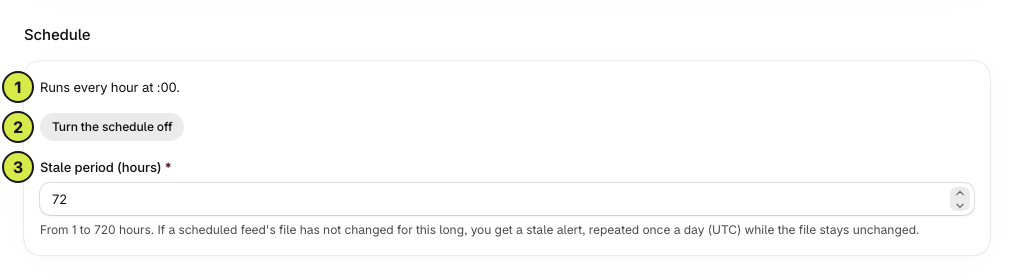
Schedules are off for a new feed, and stay off after you move to Unlimited until you turn them on for each feed. You can schedule a feed once its setup is finished.
Upload feeds and the sample feed have no schedule. An upload feed runs when you upload a new file.
When a scheduled run is skipped
- If the file has not changed since the last applied run, the run ends as Skipped and nothing is changed.
- Only one run per shop runs at a time. If another run is in progress when a feed's minute comes, or the feed has a run held for review, the scheduled run waits and is tried again each minute until the feed's next hour begins. After that, that hour's run is dropped. A run held on one feed does not delay your other feeds.
Paused schedules
A schedule pauses on its own in these cases, and the feed's page says why:
- After a rollback: the run of this feed was rolled back, so the same file is not applied again. See Rollback.
- After a move to Free: Free runs feeds manually.
- After a reinstall: Shelfsteady was uninstalled and installed again.
- After a restore: Shelfsteady's data was restored from a backup.
A paused schedule stays off until you choose Turn the schedule back on.
Stale feeds
A feed is stale when its file has not changed for longer than its stale period. A supplier file that never changes often means the supplier stopped updating it.
- The default stale period is 72 hours. Set it from 1 to 720 hours in Settings under Stale period for new feeds, or on each feed's page.
- Shelfsteady checks once a day. Only feeds with a running hourly schedule can be stale. Upload feeds, the sample feed, and feeds without a schedule are never stale.
- A stale feed shows Stale on the Feeds page and a banner on Home, and sends an alert email. The email repeats once a day while the feed stays stale.
What to do: check with your supplier that the file is still updated. If the file is meant to change rarely, set a longer stale period on the feed's page.