Rollback
A rollback reverses what one applied run changed, while keeping the sales and edits made since.
What can be rolled back
- Only the latest applied run of a feed.
- Within 30 days of that run.
- Only once.
Open the run and choose Roll back. If the run cannot be rolled back, its page says why.
What a rollback does
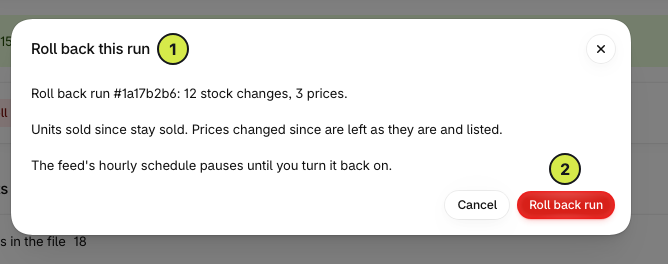
The confirmation says exactly what it will do, for example "Roll back run #42: 980 stock changes, 31 prices."
- Stock is reversed by the amount the run changed it. If the run raised a variant from 4 to 10, the rollback takes 6 away. Units sold since stay sold.
- Prices, compare-at prices and costs are restored only where they still hold the value the run wrote. A value changed in Shopify since is left as it is and listed as a conflict.
- Draft products the run created are archived, never deleted. A draft published, edited, archived or deleted since is left as it is and listed.
- The feed's hourly schedule pauses until you turn it back on, so the next run does not apply the same file again.
After the rollback
The rollback is a run of its own, listed in Runs. Its page shows how many changes were rolled back and lists every conflict with the value the run wrote and the value now. Choose Show the conflicts to see them.
Check the feed and the supplier file, then choose Turn the schedule back on on the feed's page when you are ready.
When a rollback is not possible
- A newer run of the same feed was applied. Only the latest applied run can be rolled back.
- The run finished more than 30 days ago.
- The run was already rolled back.
- Another run of your shop is in progress, or this feed has a run held for review. Wait for it to end, or approve or reject the held run.
- Runs are paused for your shop. Open the app from your Shopify admin to restore access.