Previews and applying
Every change starts as a preview. A preview (also called a dry run) compares the supplier file with your store and shows what would change. It writes nothing to Shopify.
Start a preview
- During Add feed, the last step is Preview. Choose Start preview.
- For a feed you already have, open it from Feeds and choose Start preview, or Start a new preview when one is already shown.
- For the sample feed, choose Run the sample again on its page.
- For an upload feed, open it and choose Upload a new file. A preview starts when the upload finishes.
While it runs, the page shows the current step: fetching the file, reading it, reading your store, comparing and checking the guardrails.
You can start 30 previews an hour per shop. Only one run per shop runs at a time; another one waits until it ends.
Read a preview
Open the run from the feed's page or from Runs. The run page shows:
- Counts by change type: rows in the file, matched variants, stock changes, price changes, stock to zero, not in feed, draft products, and skipped rows by reason. A matched variant the file would not change is counted as Skipped: already up to date. The sample feed's preview leaves out not in feed: it lists only a few of your variants, and nothing happens to the others.
- First run at a new location: a preview notes "First run at this location" when every matched variant has a stock change and none of them is stocked at the feed's location yet, so each stock change shows Not stocked here before. If even one matched variant is already stocked there, or changes only in price, there is no note.
- Changes: every change, variant by variant, with the field, the value before and after, and the outcome. Filter by change type, field, skip reason or guardrail.
- Guardrails: if applying this preview would be held for review, it says which guardrail and why.
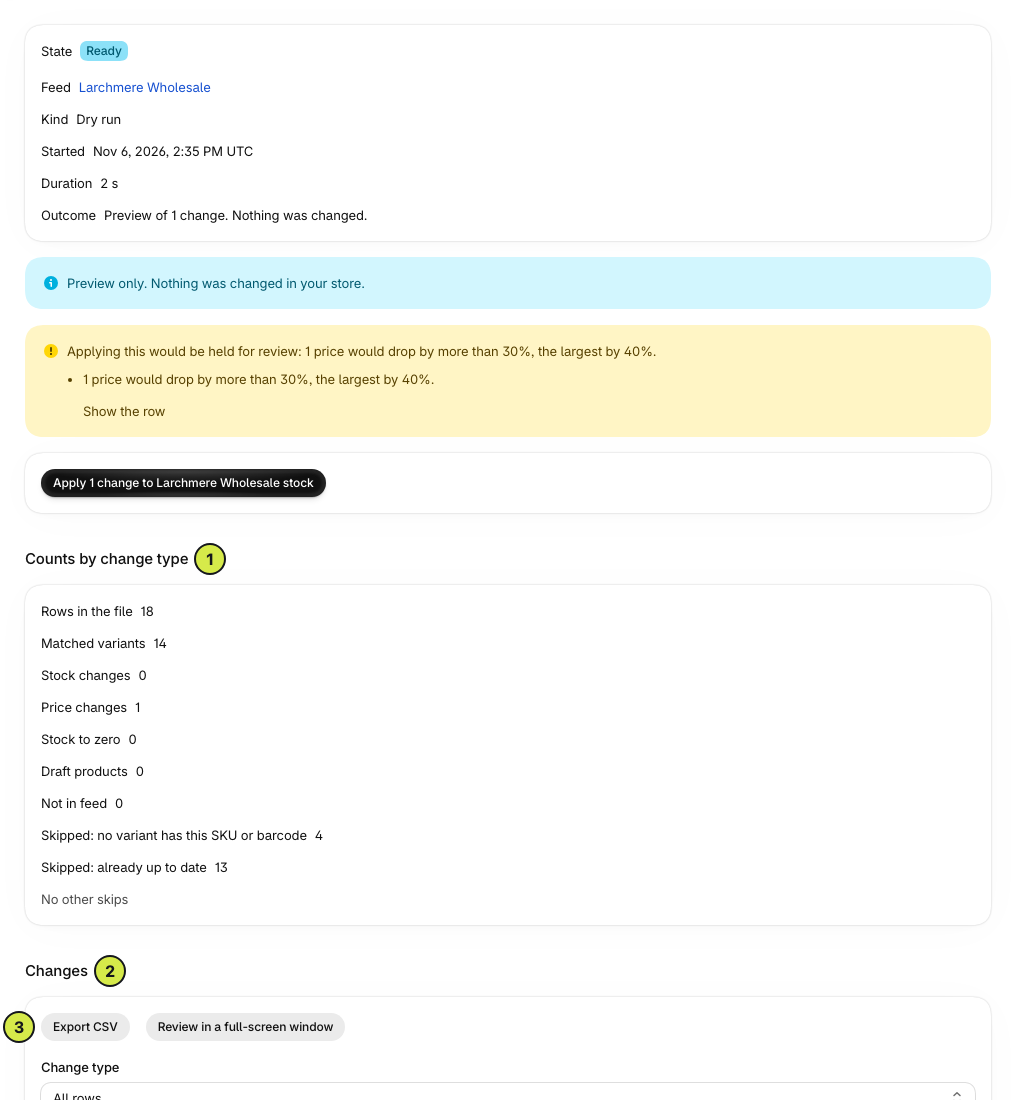
Choose Export CSV to download the changes and skipped rows. Cells that start with =, +, - or @ are made safe for spreadsheets.
Apply
When the preview looks right, choose Apply and confirm. The confirmation says exactly what will happen, such as "Apply 1,240 changes to Main warehouse".
Applying starts a new run. Shelfsteady fetches the file again, compares it with your store and checks the guardrails before anything is written. So the applied changes can differ from the preview if the file or your store changed in between.
- If a guardrail trips, the run is held for your review and nothing is changed. See Guardrails and held runs.
- If the file has not changed since the last applied run, the run ends as Skipped and nothing is changed.
- If the run would go over the Free plan's limit, it stops before writing. See Plans and billing.
What is written
Shelfsteady writes stock at the feed's supplier location, and prices, compare-at prices and costs on the variant.
- Stock is written only if it still equals the value read during the run. If it changed in between, Shelfsteady reads it again and retries.
- A price that changed in Shopify after the preview is left as it is.
The outcome of a run
| State | What it means |
|---|---|
| Ready | The preview is ready. Nothing was changed. |
| Held for review | A guardrail tripped. Nothing was changed until you approve. |
| Done | Every change was applied. |
| Partially applied | Some changes were applied and Shopify refused others. Each refused change is listed with its reason. |
| Needs review | The run stopped while writing and not every change is confirmed. Check the changes marked Not confirmed in Shopify before you run the feed again. |
| Failed | The run stopped. Nothing was changed. |
| Skipped | The file has not changed. Nothing was changed. |
| Cancelled | The run was stopped, for example because the feed was turned off. |
| Rejected | You rejected a held run, or it expired after 24 hours. |
For a failed run or one that needs review, see Troubleshooting.
Run history
Runs lists every run. Filter by feed and by state. Runs are kept for 90 days. The per-variant changes of a preview are kept for 7 days. Those of a feed's latest applied run are kept for 30 days, so it can be rolled back.